Easy Piano: Learn & Play Songs
- 4.6
- Rating
- 100.00K
- Installs
- Free
- Price
 Analysis by App-foxy
Learning piano on a phone can be surprisingly useful, but only when the app makes practice feel simple enough to repeat. I spent time with Easy Piano: Learn & Play Songs from Neli Creative, a free music and audio app built around a touch-screen piano keyboard. My first impression was that it aims for a practical middle ground: more interactive than watching a lesson, less demanding than sitting at a full instrument, and easy to open whenever a few spare minutes appear.
That approach makes sense for beginners who want to recognize notes, try familiar melodies, or build a basic habit without buying a keyboard immediately. It also suits casual players who already know a little piano and want a convenient finger exercise. At the same time, I would not mistake it for a complete replacement for a physical piano, a teacher, or a serious notation-based course. Its value is in lowering the barrier to practice, not in covering every part of musicianship.
How the current version feels in everyday use
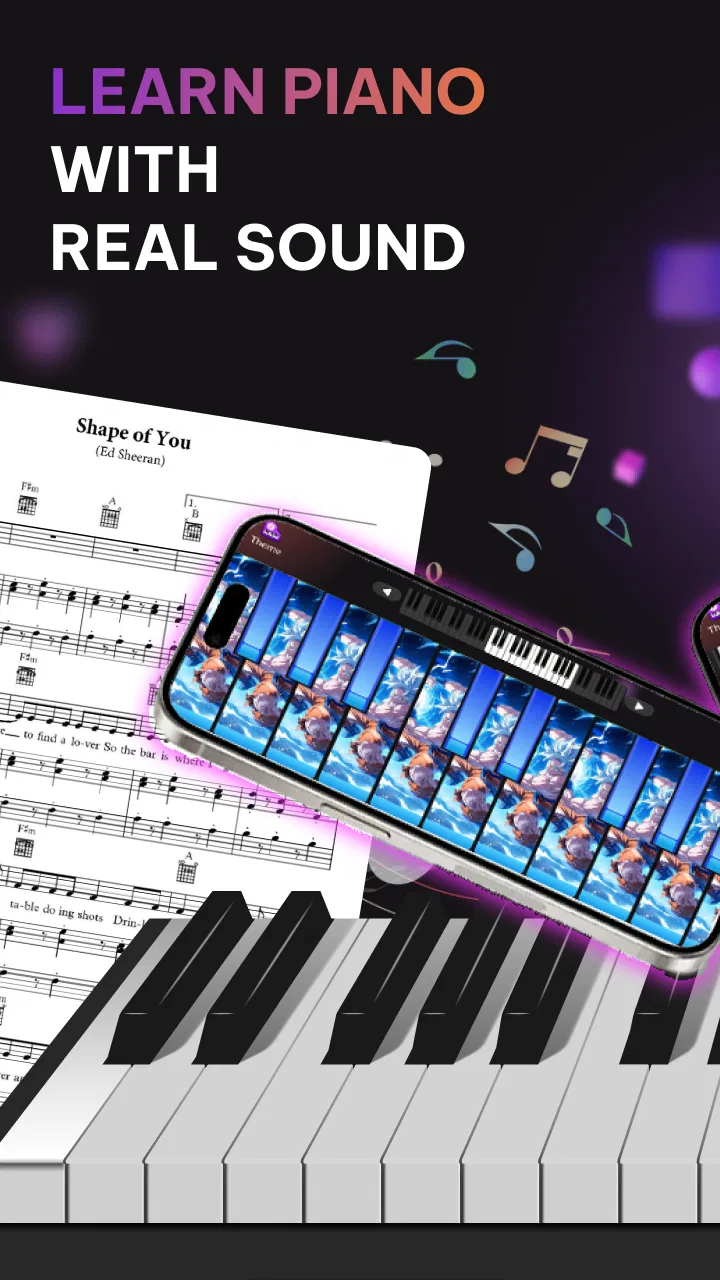
The central experience is the on-screen keyboard. Instead of treating the phone as a passive reference, the app gives you a playable surface and lets you interact directly with the notes. That difference matters. When I tap a melody myself, I have to pay attention to position, timing, and the order of the notes. Even a short session feels more active than simply listening to a song or reading a list of instructions.
You May Also Like

 AccuWeather: Weather Radar
AccuWeather Review: A Quick, Clear Forecast for Everyday Decisions
For everyday plans, the best forecast is the one you can understand quickly. AccuWeather makes rain timing, radar, and local conditions easy to act on, with a few trade-offs.

 Hill Climb Racing
Why Hill Climb Racing Still Turns Crashes Into One More Run
A tiny car, a bumpy hill and one more upgrade: Hill Climb Racing keeps resurfacing because its simple chaos makes every near-miss feel personal.

 AliExpress - Shopping App
AliExpress Makes Global Shopping Feel Personal, but Shoppers Bear the Risk
AliExpress turns a global marketplace into a pocket-sized discovery engine. Its reach is useful, its shopping loop compelling, and its trade-offs easy to miss.

 Lords Mobile: Kingdom Wars
Lords Mobile Is a Kingdom-Building Routine, Not a Quick Match
A case-by-case verdict on the building, battles, device demands, and social commitments that make Lords Mobile rewarding for some players and exhausting for others.

 PDF Scanner app - TapScanner
TapScanner Makes Paperwork Easier to Capture, Check, and Share
TapScanner makes scanning with a phone feel less like a rescue operation and more like a dependable step in getting work done. Its capture tools are useful, though not flawless.

 Block Blast!
 Shows How Much a Puzzle Game Can Leave Out
A quiet grid game shows why puzzle players increasingly value instant clarity, repeatable skill and low-pressure play—and where the genre still needs to catch up.
More From Our News Desk
View All News


The best way to use it is in short, focused sessions. I found it more comfortable to choose one small goal, such as locating a group of notes or repeating a short phrase, rather than trying to perform an entire song immediately. A touch keyboard encourages experimentation, but it can also make unfocused tapping feel like practice when it is really just noise. Setting a modest target keeps the session useful.
The current release is version 1.4.6, and that gives the app a reasonably mature feel for a lightweight learning tool. It is available free of charge, which makes trying it low-risk. The app is rated for Everyone, and it runs on devices using Android 9 or later. Those details make it accessible to a broad range of users, although the actual comfort of playing will still depend on your phone or tablet’s screen size and responsiveness.
On a larger display, the keyboard is naturally easier to read and tap accurately. On a small phone, the experience is more portable but less forgiving. This is one of the first trade-offs I noticed: portability helps you practice anywhere, while screen space affects how confidently you can distinguish and hit neighboring keys. If you have access to a tablet, it is likely the more comfortable choice for longer sessions, even though a phone is perfectly suitable for quick exercises.
A useful starting point for complete beginners
For someone who has never touched piano before, the app’s greatest strength is psychological. A real keyboard can look intimidating, especially when you do not yet know where to put your hands. A virtual keyboard lets you begin immediately. You can tap a note, hear the result, and make another attempt without worrying about disturbing anyone nearby or making a costly commitment.
I would recommend starting with orientation rather than speed. Spend a few minutes identifying repeating groups of black keys and noticing how the white keys sit around them. This visual pattern is more useful than memorizing isolated positions. Once that layout starts to make sense, simple melodies become easier to follow because you are navigating a map instead of guessing at random.
Another practical tip is to use one finger deliberately at first. Beginners often try to imitate an advanced hand position before they understand the keyboard. That can create unnecessary tension. With this kind of mobile app, a single-finger approach is a sensible first stage: locate the notes, keep a steady pulse, and only then think about using more fingers. It is not elegant piano technique, but it is an effective way to build orientation.
The app is also a good fit for parents looking for a gentle musical activity that does not require a full setup. Since the content rating is Everyone, it can be considered for a wide age range, although younger children will still benefit from an adult helping them turn random tapping into a small, repeatable exercise. The app can open the door to music, but guidance is what turns access into learning.
Where it fits beside other music-learning options
Compared with video lessons, this app gives me a more immediate role. A video can explain posture, rhythm, and technique clearly, but it is easy to watch without actually playing. The virtual keyboard removes that temptation by putting the instrument directly under my fingers. On the other hand, video instruction is usually better for seeing hand shape, understanding musical context, and correcting habits that a touch screen cannot observe.
Compared with a physical keyboard, the advantages are convenience and privacy. I can practice in a waiting room, during a quiet break, or while traveling without carrying an instrument. The compromise is physical feedback. A phone screen does not provide the same key resistance, spacing, or tactile response as a real piano. That means skills learned here may not transfer perfectly when you move to an acoustic piano or electronic keyboard.
Compared with more structured piano courses, Easy Piano: Learn & Play Songs feels less like a complete curriculum and more like an approachable practice companion. A dedicated course may offer deeper theory, graded progression, recording tools, or detailed feedback. This app is a better match for the person who wants to start playing now and decide later how seriously to pursue formal study.
That distinction is important before downloading it. If your goal is to pass an exam, develop advanced sight-reading, or learn proper two-hand technique from the beginning, I would choose a structured program alongside a real keyboard. If your goal is to explore melodies, make practice less intimidating, and use spare moments constructively, this app makes a stronger case.
What the release history suggests for users
The app was released on May 28, 2026, and its current version shows that Neli Creative is maintaining the product rather than leaving it as a one-off keyboard toy. I see that as a positive sign for existing users: the app has moved beyond its initial launch stage and is being presented in a current, usable form. Still, a version number alone should not be treated as proof of a particular feature or major redesign. What matters in daily use is whether the present experience remains clear and dependable.
For someone installing it today, the main benefit of the current release is starting from the version the developer is actively presenting now, rather than judging the app by an older first impression. Existing users should update with realistic expectations. A newer version can improve stability or polish, but it does not automatically turn a simple touch keyboard into a full piano school. The core appeal remains quick access to playable notes and song-oriented practice.
The app has reached over one hundred thousand installs and holds a 4.6 average from more than two hundred ratings. Those figures suggest that the concept is connecting with a meaningful audience, while the rating indicates generally positive reception. I would read that as encouragement to try it, not as a guarantee that every learner will have the same experience. Touch controls, preferred teaching style, and expectations about song depth can change the verdict considerably.
For existing users, the most sensible way to judge an update is to revisit the parts that affect practice directly. Does the keyboard remain easy to read? Do familiar exercises feel responsive? Is it still quick to begin a short session? These questions are more useful than expecting every release to introduce dramatic changes. In an app designed for repetition, small improvements to clarity and flow can matter more than flashy additions.
Small workflows that make the app more valuable
One workflow I found effective was to separate discovery from repetition. In the first pass, I would explore the melody slowly and accept mistakes. In the second pass, I would repeat only the difficult fragment instead of restarting the whole song each time. This prevents the easy opening from consuming the entire session and concentrates attention where progress is actually needed.
A second useful habit is silent mapping before playing. Look at the keyboard and identify where the next few notes appear, then tap them at a deliberately slow pace. This feels less exciting than immediately chasing speed, but it reduces frantic searching. Once the route is familiar, increase the tempo naturally. The app’s touch format makes this especially helpful because visual preparation can compensate for the lack of tactile landmarks.
I also recommend treating the phone as a practice notebook rather than a stage. Use it to remember a melody, test whether you enjoy learning piano, or maintain momentum between lessons. Do not judge yourself by how impressive the result sounds during the first attempts. The real benefit is building recognition and coordination. That mindset keeps the app useful even when the virtual keyboard cannot reproduce the full feel of an instrument.
For a busy day, a realistic routine might be a few minutes during a commute break or before bed. Start by locating the notes, play one phrase slowly, then repeat it without looking away from the keyboard constantly. End after a small success rather than continuing until frustration takes over. This kind of routine is more sustainable than waiting for a long, perfectly quiet practice period that may never arrive.
Where the experience still has limits
The biggest limitation is inherent to touch-screen piano apps: the surface is visual and flat. You do not feel the boundary of each key in the same way, and your fingers receive little physical information about pressure or position. That makes the app excellent for note familiarity but weaker for developing the touch, dynamics, and hand control associated with a real piano.
Screen size creates another boundary. On a phone, accuracy can become difficult when several notes sit close together, especially for users with larger fingers or anyone trying to play quickly. A tablet improves visibility, but it still does not solve the absence of physical keys. I would therefore use the app for melodic practice and orientation, then move to a real keyboard when technique becomes the priority.
There is also a motivational limitation. A song list or interactive exercise can encourage repetition, but an app cannot replace personal feedback. It may not tell you that your wrist is tense, that your fingering is inefficient, or that your rhythm is drifting in a way you do not notice. Learners who need accountability may progress faster with a teacher, a course that evaluates performance, or a practice partner.
People who already play advanced piano should approach it differently. The app may be handy for recalling a simple tune or passing time, but it is unlikely to satisfy someone seeking nuanced expression, complex chord work, or realistic performance practice. The touch keyboard is a convenience tool, not a substitute for weighted keys and a full range of physical control.
Privacy-conscious users should also make their normal app-store checks before installing, particularly if they are using a child’s device. I would review the permissions and device behavior shown during installation rather than assuming that every music app works identically. The Everyone rating is reassuring about intended audience, but it does not remove the need for sensible supervision with younger users.
Who should try it, and what to watch next
I think this is a strong first step for curious beginners, casual learners, travelers, and anyone who wants a piano experience without setting up an instrument. It is especially appealing if you tend to abandon ambitious learning plans because they feel too formal. Opening a free app and playing a short melody is an easier commitment than arranging lessons or buying equipment.
I would skip it as a primary solution if you already know that you need detailed theory, proper finger training, two-hand coordination, or teacher-style correction. In those cases, use it only as a supplement. A physical keyboard paired with structured instruction will give you a more complete foundation, even if it is less convenient.
When considering future updates, I would watch for improvements that make practice more precise rather than merely adding decoration. Clearer progression, better ways to isolate difficult phrases, stronger rhythm guidance, and options that bridge virtual practice with a real keyboard would all increase the app’s long-term value. Those are areas worth watching, but they should be treated as expectations, not promises about what the developer will add.
My final view is positive but measured. Easy Piano: Learn & Play Songs succeeds because it makes the first interaction with a piano feel approachable. It is free, broadly accessible, and focused enough to support short, repeatable practice. Its 4.6 average and growing install base fit my impression that many users will find the simplicity appealing.
It is not the app I would choose for complete piano training, and the touch-screen limitations become obvious as soon as you want realistic technique. But for testing your interest, learning basic note locations, practicing a melody during spare time, or giving a child a gentle introduction to keyboard playing, it is a sensible download. I would begin with small goals, use a larger screen when possible, and treat the app as a doorway into piano rather than the entire room.
FAQs for Easy Piano: Learn & Play Songs
01What is Easy Piano: Learn & Play Songs?
Easy Piano: Learn & Play Songs is a beginner-oriented piano learning app designed to help users practice melodies, chords, and popular songs through an interactive virtual keyboard. It generally combines guided lessons, song tutorials, and play-along exercises, making it suitable for people who want to explore piano basics without owning a physical instrument. The exact lesson library and available tools may vary by device and app version.
02Can complete beginners use Easy Piano: Learn & Play Songs?
Yes, the app is mainly aimed at beginners and casual learners. Its guided approach can help users become familiar with note positions, rhythm, and simple melodies before moving to more challenging pieces. However, it should be viewed as a convenient practice aid rather than a complete replacement for a teacher. Regular practice, patience, and gradually increasing the difficulty will be important for making meaningful progress.
03Does Easy Piano: Learn & Play Songs require a real piano or keyboard?
No, you can normally use the application with your phone or tablet’s touchscreen keyboard, so a separate piano is not required to begin. This makes it convenient for practicing short exercises anywhere. Nevertheless, the small screen and touch controls may not provide the same experience as a full-size keyboard. Users who want to develop stronger technique may eventually benefit from connecting or practicing on a real instrument.
04Is Easy Piano: Learn & Play Songs free to download and use?
The app may be available to download at no initial cost, but some lessons, songs, practice features, or customization options can be restricted behind in-app purchases or a subscription. Availability can also differ between Android and iOS, and pricing may change over time. Before confirming a purchase, check the store listing carefully for trial terms, recurring billing details, advertisements, and the features included in the free version.
05Does the app work offline, and is it suitable for children?
Some basic piano practice functions may work without an internet connection after the necessary content has been loaded, but song libraries, updates, advertisements, account features, or premium verification may require access to the internet. The colorful and simple format can appeal to children, although parents should review the app’s age rating, advertising, privacy policy, and in-app purchase settings before allowing unsupervised use.
Pros
- Simple lessons make it approachable for complete beginners.
- Song-based practice keeps learning engaging and goal-oriented.
- Works well for short practice sessions on a phone or tablet.
- Touch controls are easy to understand and responsive.
- Useful for learning basic melodies without owning a piano.
Cons
- The small virtual keyboard can feel cramped on phones.
- Advanced players may find the lesson content too limited.
- Some features may require an in-app purchase or subscription.
- Touchscreen feedback cannot fully replace playing a real piano.
- Progress may feel repetitive after mastering the included songs.

Easy Piano: Learn & Play Songs
Gallery